
Three.jsで作るWebVRの操作面について考える【注視点カーソル】
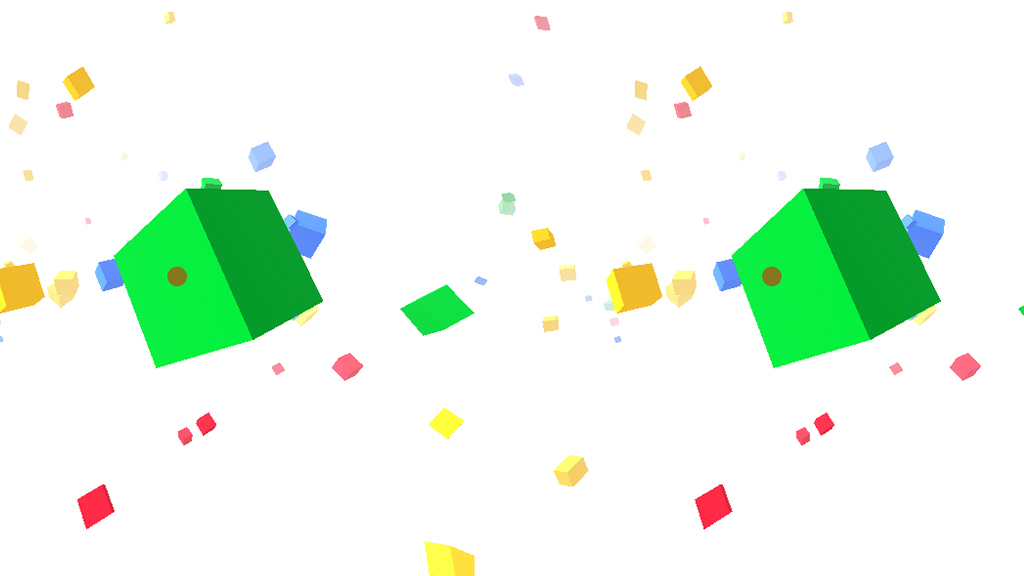
Three.jsで作ったVRコンテンツに注視点カーソルを実装
Three.jsでwebVRコンテンツを作るお勉強中です。
前回は、用意したThree.jsコンテンツをCardboardに対応したVRコンテンツにしてみました。
今回は操作についても少し考えてみようと思います。
そういえば触れてませんでしたが、基本的にiPhone確認です。
Androidで動かないとかあったら教えてください。
スマホVRの主な操作は下記な感じ。
・GoogleCardboardのスイッチを使う(磁気センサーか画面タッチ)
・ハコスコなどのHMD本体下部に空いた穴から指を入れて直接画面タッチ
・視線を向けた中心にあるオブジェクトが反応する注視点カーソル
・ジャイロや加速度などのセンサーを使い、頭を振ったりジャンプするなどで操作する
・milboxタッチのインターフェース
などなど。
今回は3つめ「注視点カーソル」を実装してみようと思います。
Three.jsの基本機能を使って実装しますが、なにかお気づきの点あればご指摘下さい。
では早速、今回のゴールはこちら
→サンプルを確認(Cardboardで見て下さい。)
左右画面の中心にカーソルを置く
まず左右の画面それぞれの中心にカーソルを配置します。方法はいくつかあって、おそらくThree.jsで描くのが一般的かと思うのですが、cssで置いた方が今後いろいろ演出つけたりするのが楽そうだったのでhtmlにdivタグで置いちゃいました。(いいのか?)
HTML
<body>
  <div id="base"></div>
  <div id="world">
    <div id="cursors">
      <div class="cursor cursor-l"><p class="dot"></p></div>
      <div class="cursor cursor-r"><p class="dot"></p></div>
    </div>
  </div>
</body>
CSS
#cursors{
  position: absolute;
  display: table;
  top: 0;
  left: 0;
  width: 100%;
  height: 100%;
  z-index: 10;
}
#cursors .cursor{
  position: absolute;
  width: 0;
  height: 0;
  top: 50%;
}
#cursors .cursor-l{
  left: 25%;
  margin-left: -10px;
}
#cursors .cursor-r{
  right: 25%;
  margin-right: -10px;
}
#cursors .cursor .dot{
  position: relative;
  width: 10px;
  height: 10px;
  margin-top: -5px;
  margin-left: -5px;
  border-radius: 50%;
  background: #f00;
  opacity: 0.5;
}
ハイライトしてある2行で、右と左のカーソルの位置を微調整してます。
左右それぞれの”ど真ん中”だと焦点が合わないので、見たときに2つのカーソルがピッタリ重なるように左右に少しズラしてます。
THREE.Raycasterでカーソルが指すオブジェクトを取得
中央に置いたカーソルが指す(つまり画面中央にある)オブジェクトを取得するのに、今回はTHREE.Raycasterを使用しました。
THREE.Raycasterは3D空間内のオブジェクトをマウスで触れるようにするときなどに使用する、座標とオブジェクトの衝突判定です。
同じような衝突判定にWebGLRenderer.readRenderTargetPixels(GPU)などもありますが、とりあえず難しいこともやらないので個人的に使いやすいほうで。
→THREE.Raycaster example
→readRenderTargetPixels example
マウスの判定のときなどはマウス座標を-1〜+1の数値に変換して判定するのですが、今回は中央座標を判定すればいいので変換とか気にせず(0,0)で。
必要な変数を定義
var raycaster,scopedObj;
var cursor= new THREE.Vector2(0,0);
・・・中略・・・
raycaster = new THREE.Raycaster();
render内でオブジェクトを判定しアクション発火
(今回はスケールを大きくしてます。)
function render() {
  ・・・
  // ポイントが乗っているオブジェクトを取得
  raycaster.setFromCamera( cursor, camera );
  var intersects = raycaster.intersectObjects( group.children );
  if ( intersects.length > 0 ) {
    if ( scopedObj != intersects[ 0 ].object ) {
      if ( scopedObj ) scopedObj.scale.set(1,1,1);
      scopedObj = intersects[ 0 ].object;
      scopedObj.scale.set(2,2,2);
    }
  } else {
    if ( scopedObj ) scopedObj.scale.set(1,1,1);
    scopedObj = null;
  }
  ・・・
}
まとめ
冒頭にも書きましたが、今回のゴールはこちら
→サンプルを確認(Cardboardで見て下さい。)
ソース全体はこんな感じ。(長いので折りたたんでます)
HTML
<html>
<head>
  <meta charset="UTF-8">
  <meta name="keywords" content="">
  <meta name="description" content="">
  <title>webVRサンプル|CardboardClub</title>
  <meta name="viewport" content="width=device-width, user-scalable=no, minimum-scale=1.0, maximum-scale=1.0">
  <meta http-equiv="X-UA-Compatible" content="IE=edge"/>

  <style>
    *{
      margin: 0;
      padding: 0;
    }
    #base{
      position: absolute;
      left: 0;
      width: 100%;
      height: 9000px;
      z-index: -1;
    }
    #world {
      position: fixed;
      top: 0;
      left: 0;
      right: 0;
      bottom: 0;
    }
    #cursors{
      position: absolute;
      display: table;
      top: 0;
      left: 0;
      width: 100%;
      height: 100%;
      z-index: 10;
    }
    #cursors .cursor{
      position: absolute;
      width: 0;
      height: 0;
      top: 50%;
    }
    #cursors .cursor-l{
      left: 25%;
      margin-left: -10px;
    }
    #cursors .cursor-r{
      right: 25%;
      margin-right: -10px;
    }

    #cursors .cursor .dot{
      position: relative;
      width: 10px;
      height: 10px;
      margin-top: -5px;
      margin-left: -5px;
      border-radius: 50%;
      background: #f00;
      opacity: 0.5;
    }

  </style>

  <script type="text/javascript" src="./js/lib/jquery-1.11.1.js"></script>
  <script type="text/javascript" src="./js/lib/three.min.js"></script>
  <script type="text/javascript" src="./js/lib/OrbitControls.js"></script>
  <script type="text/javascript" src="./js/lib/DeviceOrientationControls.js"></script>
  <script type="text/javascript" src="./js/lib/StereoEffect.js"></script>
  <script type="text/javascript" src="./js/lib/Detector.js"></script>
  <script type="text/javascript" src="./js/lib/stats.min.js"></script>
  <script type="text/javascript" src="./js/index.js"></script>

</head>

<body>
  <div id="base"></div>
  <div id="world">
    <div id="cursors">
      <div class="cursor cursor-l"><p class="dot"></p></div>
      <div class="cursor cursor-r"><p class="dot"></p></div>
    </div>
  </div>
</body>
</html>
js
var container;
var camera, scene, renderer, element, controls;
var group;
var baseColor=0xffffff;

//THREE.Raycaster用
var raycaster,scopedObj;
var cursor= new THREE.Vector2(0,0);

$(function() {
	if ( ! Detector.webgl ){
	  Detector.addGetWebGLMessage();
	}else{
	  init();
	  animate();
	}
});

function init(){
  scene = new THREE.Scene();
	container = document.getElementById('world');

	camera = new THREE.PerspectiveCamera( 90, window.innerWidth / window.innerHeight, 1, 10000 );
  camera.position.z = 2000;

	//THREE.Raycaster
	raycaster = new THREE.Raycaster();

	renderer = new THREE.WebGLRenderer({ alpha: true });
	renderer.setPixelRatio( window.devicePixelRatio );
	renderer.setClearColor(baseColor);
	container.appendChild( renderer.domElement );

  //Light
  ambLight = new THREE.AmbientLight( 0xffffff, 0.5 );
	scene.add( ambLight );
	//
	dirLight = new THREE.DirectionalLight( 0xffffff, 1 );
	dirLight.position.set( 1,1,1 );
	scene.add( dirLight );

  //マウス操作
  controls = new THREE.OrbitControls(camera);
	controls.rotateUp(Math.PI / 4);
	controls.target.set(
		camera.position.x + 0.1,
		camera.position.y,
		camera.position.z + 1
	);
	controls.noZoom = true;
	controls.noPan = true;

	//ジャイロに切り替え
  function setOrientationControls(e) {
    if (!e.alpha) {
      return;
    }
    controls = new THREE.DeviceOrientationControls(camera, true);
    controls.connect();
    controls.update();
    window.removeEventListener('deviceorientation', setOrientationControls, true);
  }
  window.addEventListener('deviceorientation', setOrientationControls, true);

  //両眼カメラレンダリング
  effect = new THREE.StereoEffect( renderer );
	//effect.eyeSeparation = 5;

	stats = new Stats();
	stats.domElement.style.position = 'absolute';
	stats.domElement.style.top = '0px';
	container.appendChild( stats.domElement );

  scene.fog = new THREE.Fog( baseColor, 500,cubeAreaSize );

	window.addEventListener( 'resize', resize, false );
	setTimeout(resize, 1);

  makeCubes();

}

function resize() {
	var width = window.innerWidth;
	var height = window.innerHeight;
	camera.aspect = width / height;
	camera.updateProjectionMatrix();
	//renderer.setSize( width, height );

  effect.setSize( width, height );
}

function update(){
  cubeUpdate();
}
function render() {
  controls.update();
	//renderer.render( scene, camera );


	// ポイントが乗っているオブジェクトを取得
	raycaster.setFromCamera( cursor, camera );
	var intersects = raycaster.intersectObjects( group.children );
	if ( intersects.length > 0 ) {
		if ( scopedObj != intersects[ 0 ].object ) {
			if ( scopedObj ) scopedObj.scale.set(1,1,1);
			scopedObj = intersects[ 0 ].object;
			scopedObj.scale.set(2,2,2);
		}
	} else {
		if ( scopedObj ) scopedObj.scale.set(1,1,1);
		scopedObj = null;
	}


  effect.render( scene, camera );
}
function animate() {

	requestAnimationFrame( animate );

  update();
	render();
	stats.update();
}


//CUBE
var cubeColors=[
  0x3369e8,
  0xd50f25,
  0xeeb211,
  0x009925
];
var cubes=[],
cubeCnt=300,
cubeSizeBase=100,
cubeSizeRnd=300,
cubeAreaSize=12000;

function makeCubes(){
	group = new THREE.Group();
	scene.add( group );
  for(var i=0;i<cubeCnt;i++){
    var cube=new Cube();
    group.add(cube.obj);
    cubes.push(cube);
  }
}

function cubeUpdate(){
  for(var i=0; i<cubes.length; i++){
    cubes[i].update();
  }
}

var Cube=function(){
  var size=Math.random()*cubeSizeRnd+cubeSizeBase;
  this.geometry=new THREE.BoxGeometry( size, size, size );
	this.material=new THREE.MeshPhongMaterial({color:cubeColors[Math.floor(Math.random()*cubeColors.length)]});
  this.obj=new THREE.Mesh( this.geometry, this.material );
	this.obj.position.x=Math.random()*cubeAreaSize-cubeAreaSize/2;
	this.obj.position.y=Math.random()*cubeAreaSize-cubeAreaSize/2;
	this.obj.position.z=camera.position.z+(Math.random()*cubeAreaSize*2-cubeAreaSize);
	this.obj.rotation.x=Math.random()*2*Math.PI;
	this.obj.rotation.y=Math.random()*2*Math.PI;
	//this.obj.matrixAutoUpdate = false;
	//this.obj.updateMatrix();
  this.zSpeed=-(Math.random()*20+10);
  this.rSpeedX=Math.random()*0.2-0.1;
  this.rSpeedY=Math.random()*0.2-0.1;
};
Cube.prototype={
  update:function(){
    if(this.obj.position.z<camera.position.z-cubeAreaSize-1000){
      this.obj.position.z=camera.position.z+cubeAreaSize;
    	this.obj.position.x=Math.random()*cubeAreaSize-cubeAreaSize/2;
    	this.obj.position.y=Math.random()*cubeAreaSize-cubeAreaSize/2;
    }
    this.obj.position.z+=this.zSpeed;
    this.obj.rotation.x+=this.rSpeedX;
  	this.obj.rotation.y+=this.rSpeedY;
  }
};
いかがでしょう?
スマホVRで“何かを選択する”というアクションには、この注視点を使用するケースが多そうなので、逆に言えば、これさえ使い慣れちゃえば、応用して何でも出来るってことでしょう!